Residential Services
Welcome to the new spam filtering within Horde 5!
Spam filtering is now easier to use as it will automatically identify
unwanted emails as Spam. It works by labelling emails
with "suspicious" characteristics (such as a
blocked return address) as well as emails from known
Spam lists. This allows your email program to
automatically filter these emails to a Spam folder
where you can proceed to delete them at your
convenience.
To enable spam filtering for suspicious emails, please follow the steps below.
- 1. Close Outlook (or your regular mail reader)
Then go to the following web address: https://ssl.sentex.ca/horde/login.php to login to Horde (IMP) webmail.
The sentex_username is the first part of your email address.
(eg. sentex_username for would be just bitbucket)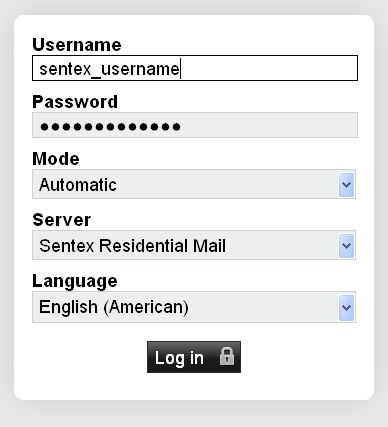
- 2. Configure Spam Filtering:
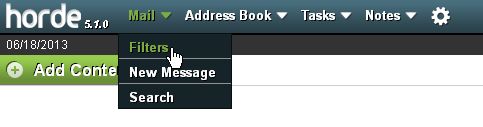
Once logged into Horde, point your cursor to Mail at the top left and select Filters
Next, you will want to click on Spam Filter to enter the management area.
In here, you will be able to adjust the spam level and which folder will receive spam messages. By default, the spam level is 5 and the lower the number, the more aggressive the filtering will be.
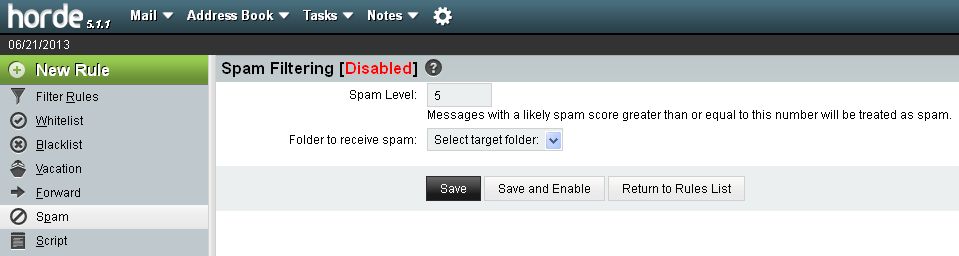
Once you have modified the settings accordingly, click the 'Save and Enable' button.